Showing posts with label gadgets and technology. Show all posts

Friday, May 4, 2012

Google Zerg Rush - Easter Egg Game

Now, Google re-experimenting with its new easter egg game, At this time with the Zerg Rush theme. This is an arcade game to shoot aliens who want to destroy the Google search results page.

By using google chromebrowser or mozilla firefox, open google and type "Zerg Rush" , here: http://www.google.co.id/search?q=zerg+rush&button=Google+Search

The Easter egg refers to the StarCraft game that made ​​by Blizzard, the developer of World of Warcraft game. In the Starcraft game, there are three types of occupants, the Protoss, Terran, and zerg. Zerg is an alien nation. The Zerg has a unique force called "Zergling" is a small alien is a small alien whose job attacking enemy buildings in groups.

If a player has the Zergling troops in large numbers and attack towards the enemy barrage, then this is called "Zergling Rush". There is also a game site called Zerg Rush, where players will be placed in the middle of a location that is surrounded on all sides Zerlgings. Players must retain the area as an easter egg in this game.

So, how to play this Zerg Rush game? After you typing the "Zerg Rush " in the Google search box, you will be faced with a bunch of aliens in the form of the letter "O" [it's looks like the Opera browser logo]

Your job is to protect the google search results of alien attacks, the "O". Point your mouse pointer and click at them many times to destroy them. The "O" Force will try to destroy every part of the google search page, including on the left menu.

So? Are you ready to try this exciting game? Type "zerg rush" in Google and start your fight against those Zerg Aliens!


How to play this Zerg Rush,Video


Wednesday, March 21, 2012

Celebrate Holidays in Russia

celebrate holidays in russiaCelebrate Holidays in Russia - Russia also has several holidays just like any other countries in the world. However, you will find several differences on how Russian people enjoy their holiday. The difference is that the holiday in Russia is last long. The people even prepare for the holiday at least a day before the D-day arrives.

The Russian people usually get two or three free days to enjoy their holiday, or sometimes more. In other countries, most shops, groceries, or supermarket are close during the holiday, while in Russia, you will find them keep open throughout the holiday, and open until late evening. Russian people also never mind about business during their holiday. So never come up with business plan during the holiday.

During the holiday, traffic is not as crowded as regular days. This condition is quite good for foreigners who want to travel around the city.

There are nine official holidays in Russia. However, Russian people find no reason needed to celebrate their special day.

Related: Construction Jobs Use War Vehicles in Russia , Tattoo Pics

Thursday, May 5, 2011

4 sim cards cell phone, OTECH F1 made in China

Otech F1 cell phone is a mobile phone that can use 4 pieces of SIM card, and can be used simultaneously - made in China

otech f1 phone 4 SIM-cardsthe back side of the OTECH F1 phone

At the top screen of this quad SIM support phone, we can see the signal strength of each network that we can use.

Otech F1 quad SIM support china mobile phone
Regardless of the network used, this 4 SIM-cards cell phone is perfect for those of you who have a lot of phone numbers used for different purposes.

In addition capable of handling 4 pieces of SIM cards, the mobile phone that looks like the Blackberry, even on the menu, has a 2.4 inch touch screen, TV Receiver, FM Radio, Bluetooth and 12.1 MP camera

Related: Google attacked by hacker in China


Support to my ass kicking SEO 2011 by seokick7.com and Mercedes-Benz Indonesia

Wednesday, May 4, 2011

BlackBerry Bold 9900 and 9930 smartphones, latest products from RIM

Latest BlackBerry-Bold model 9900 and 9930 -Smartphones
BlackBerry Bold 9900 and 9930 smartphones - The BlackBerry maker, Research In Motion [RIM] introduced 2 new products, 9900 and 9930

In the BlackBerry World event that held on may 2th - 5th 20011 in Orlando, Florida, RIM demonstrated 2 new smartphones. This BlackBerry Bold model incorporates a touch screen capability and a QWERTY keyboard.

In addition, this new device using the latest BlackBerry operating system, the BlackBerry 7 (not seokick 7 [Ramadama Dingdong]). The new smartphone has the NFC technology (Near Field Communication) also, which its functions like an electronic wallet.

These new smartphones using the Liquid Graphics 1.2 GHz processor and can run on the 4G/HSPA network . But there is no definite date from the RIM, when these 9900 and 9930 will be marketed.

BlackBerry Bold 9900 & 9930 First Look


Monday, March 21, 2011

Cheap Electronic Cigarette - ( electrical ) e-cigarette

Cheap Electronic Cigarette - e-cigarette or smoking electrical that is an innovation of the conventional form of cigarettes into a modern cigarette. Electronic cigarette was first developed in 2003 by SBT Co. Ltd., a Beijing-based company, in RRC, which is currently controlled by Golden Dragon Group Ltd In 2004.

Electronic Cigarette or e-cigarete picture


The Electronic Cigarette claimed as a healthier Cigarette and more environmentally friendly than regular cigarettes and will not cause odor and smoke. In addition, the electronic cigarette (ecigarette) is more efficient and cheap than regular cigarettes because it can be refilled. The shape of e-cigarette is ENDS-shape as regular cigarettes. But it doesn't burns tobacco, like a conventional cigarette products. This cigarette burns and steam fluid using a battery, and its steam enter into the user's lungs. Electronic Cigarete Products were marketed under many names, including electric cigarette, ecigarro, electro-smoke, green-CIG, and smartsmoker, or perhaps you would call it "false cigarette"...

Cheap Electronic Cigarette

Well..There are many success stories from people who claim that they have been able to quit smoking after they decided to buy e-cigarettes. So, my best recommendation to buy cigarettes with low prices and best quality is at : Electronic Cigarette UK

Buy Cheap Electronic Cigarette, electrical Cigarete, eletrical/eletric, e-cigarete

Monday, March 14, 2011

Uber Social Blackberry - UberTwitter is now UberSocial

Uber Social For Blackberry - UberSocial is the new device from UberTwitter, or Substitute of Uber Twitter.

After the ubertwitter experiencing problems with third parties, read here: Twitter suspends UberTwitter and Twidroyd for 'violating' its policies. Currently there are few applications that are hunted by BlackBerry and iPhone lovers , 2 applications that most preferably are SocialScope and UberSocial...

Indeed, as I know that most of twitter users especially in Indonesia, most of them don't like the official twitter application. The reason, because the UberTwitter is far better than official twitter applications..


Short gossip about the UberTwitter and Twidroyd Controversy - Twitter now banned UberTwitter, Reportedly UberTwitter is in violation of Twitter copyright and trademarks. Twitter maintains that it has been in contact with UberTwitter since April 2010 and says the suspension will be lifted as soon as UberTwitter affects some small changes.

Uber Social Blackberry Twitter Download

Saturday, November 20, 2010

How to Choose the Right Bluetooth Hands-Free Car Kit

Bluetooth Hands-Free Car Kit
So, you've decided to invest in a mobile hands free car kit and you've realised you can't go past a bluetooth model. Not only are these more reliable, higher quality and safer, but there's such an extensive range to choose from...which can be daunting if you don;t know what you're looking for or what's right for you.

Here's a guide to choosing the right car kit for your needs, and a few tips on what you should consider...

Cost

Bluetooth car kits can range quite a lot in cost, depending on the kind of features you require or the type of brand that it is. Obviously your biggest limitation will be how much you are willing or able to pay for the technology, so think about how much you want to spend. A good piece of advice to keep in mind, however, is that a little extra money could get you a warranty or something with a longer shelf-life--not to mention the money it could save you in fines--talking on a mobile phone without hands-free can result in a hefty payment to the boys and girls in blue!

Sound Quality

You're looking for two things when it comes to sound quality, the quality of the speakers that feed the other person's voice to you, and the quality of the pickup that feeds your voice to the other person. It can obviously be problematic to test this out in the shop (most store clerks are slightly unwilling to let you run out to the car-park and give it a whirl calling mum!) but I'd suggest once you've got your shortlist, going online and reading reviews of what consumers are saying, especially in regards to things like sound quality.

Noise Reduction

Ah the blessed noise of a truck's compression breaks right when you're in the middle of negotiating a major deal for your business! There's nothing as distracting as the background noise that comes with being on the open road, so if you're going to be making important business calls then ANR (Active Noise Reduction) might be something you want to consider. The technology helps reduce ambient noise from your surroundings and you may just be able to fool your boss into thinking you're working late in the office instead of driving the kids to soccer!

Choosing a bluetooth hands free car kit is an investment in you and your family's safety, first and foremost, but it can also save you precious time and make you more efficient in your job and personal life. Something to talk to your accountant about is whether or not you can claim tax back on a car kit if you're using it for work calls, but either way, the bluetooth will pay for itself in no time in peace of mind and productivity.


Thursday, November 11, 2010

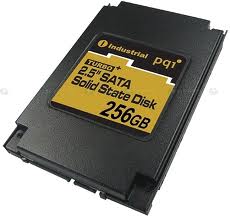
How strong solid state hard drive (SSD) endurance from attack?

ssd hardisk drive drive
SSD [Solid-state drive], Hard Disk Drive, which has the type of memory similar to the usb disk , that lately has been more commonly used by people and was famous for its speed and strength and also less easily damaged than the regular hard drive.

The question is, How strong or how resilient an SSD compared to regular hard drive? At least in the  video below, Intel demonstrated how a SSD endurance from attack .


RFuzzy Software, a tool to find out someone's feelings

RFuzzy Software
An Indonesian proverb say "Others in the mouth, another in the heart", that's what is sometimes difficult to guess someone's feelings, what is being spoken, it may be different from the feeling.

 A software, named RFuzzy developed by the Universidad Politécnica de Madrid, Spain to tell the feeling (emotion) a person when he speaks. By analyzing the sound, The RFuzzy Software can tell if someone is sad, excited or worried. RFuzzy analyzes sound measurements in speech, as that speech is output by another purpose-built application. Using fuzzy logic, it is able to determine whether the speaker is happy, sad or nervous. In cases where the emotion is not obvious, the system will still specify how close the speaker is to a certain emotion, as expressed through a percentage.

Although RFuzzy cannot ensure 100% to find out someone's feelings, RFuzzy can display the results based on percentage, eg 90% sad etc.
RFuzzy - A software application recognizes human emotions from conversation analysis
Developed at the UPM's Facultad de Informática, it has also been used to program robots participating in the RoboCupSoccer league
So, If you're interested, Learn more the details of this RFuzzy Software research in the INS- Information Science journal and can be consulted online, here : sciencedirect.com

Monday, November 1, 2010

Tuesday, October 26, 2010

iTunes 10 download released

iTunes 10 download for windowsiTunes is Apple's media player application which was originally released for the Mac OS but the latter are also available from iTunes for Windows OS. ITunes 10 now was released, it is clear that nothing has changed in Cupertino. Apple still give iTunes their customers a setup program that didn't monolithic with the option to pick and choose based on your specific needs.

What's new in the iTunes 10 ?, Which obviously Apple do a little update from the iTunes logo, and replace the logo of a CD with musical notes that the previous logo appeared on the old version of itunes.

Interestingly, in this version there is a new feature named Ping, this is a social networking application that integrates with iTunes 10 and can be used to follow-on favorite celebrities and information about them but can also be used to share music files with friends.

With the presence of the iTunes Ping service, this will be a competitor to Facebook, considering that currently there are a lot of iTunes users around the world and iTunes Ping will be a serious competitor to Facebook.

Visit the Apple site to get the latest version of iTunes 10 , here : iTunes 10 download

Friday, October 22, 2010

SopCast Download - Latest News

A program that will allow you to watch video streams using Bittorrent technology, SopCast combining broadcast media channels and distribution media under one roof, the program to examine the video streaming coming from sources that are dubious. Try to download the lastest program here : SopCast Download

There are three main components of the latest SopCast programs. Live Channels will television channels to stream television from most of China, Japan, and Korea. VoD Channels are videos-on-demand, and MyServer which allows you to broadcast media from your computer to another SopCast users.

SopCast is a simple, free way to broadcast video and audio or watch video and listen to radio on the Internet. Adopting P2P (Peer-to-Peer) technology is very efficient and easy to use.

The SopCast Let people be broadcaster without the costs of a server with large bandwidth. We can build your own TV station as compared to large commercial sites with minimal resources.

And you may embed all SopCast-channels to your site / blog (example here: online.free-7.net) , just copy-pasting the following code:

<iframe id="SopFrame" name="SopFrame"
frameborder="0" src="http://www.easetuner.com/
channel/getchlist.iframe.html" width="800"
height="350" scrolling="no">
The browder doesn't support iframe.</iframe>

Okay, Learn more and Download Latest SopCast program at www.sopcastSopCast .com

Friday, October 15, 2010

Windows phone 7 launched

windows 7 phoneMicrosoft finally announced Windows Phone 7, in October 2010 in Europe. While in America this platform will follow in November.

The above is disclosed by Microsoft COO Kevin Turner. "As said before, for me this is true. In October and November we will return to play, and this game is not yet finished," he said.

According to Turner now there are 200 million smartphones sold in the market. "If you think what happened three or five years, there will be 400-450 million smartphones," he continued.


Turner is believed that on this occasion, Microsoft will make major changes go into competition with smart phone competition. Talking about Windows 7 phone that will be present, Turner also gives notes "When you see this phone and the user interface, it's not like Microsoft's mobile phones ever released before,"

Meanwhile, Samsung has introduced a new product that will use Windows phone named Samsung Cetus, While HTC is also rumored will release a product called HTC Mystery

Windows phone 7 , windows mobile 7, windows 7 phones

Saturday, September 18, 2010

How to remove or delete linux from harddisk drive and restore the MBR partition table safely

delete linux from computer pc or harddiscRemoving linux from windows partition - If you have a dual-boot with Linux and Windows, then you probably know that when you start your system Linux boot loader who first appeared to show Linux and then Windows boot entries and if you choose Windows from the list, it starts Windows.

Well now you are in situations when you want to remove Linux from your system and just want to use Windows, then how would you do?

A lot of people delete the Linux partition after installation of the "Disk Manager" can not delete it but Linux as a whole. Linux boot loader still appears at startup and as you remove the Linux partition, the boot loader will be corrupted and your system becomes unusable or being damaged


First of all you need to know where your Linux OS is installed to. that is what drive it is currently living on. Bear in mind that Linux formats the drive as HFS rather than Fat/Fat32 or NTFS. [These are the file systems used by various Operating Systems].

So HFS Partitions are not seen by windows, so its hidden.

To remove the partitions of Linux in WindowsXP go to your 'Control panel' - Admistrative Tools - Computer Managment

Open 'Disk Management' and you will see your Linux drives recognised as 'Unknown Partition' plus the status of the drive. Bearing in mind you know what partition and disk you installed to it will be easier to recognise as the drive/partition where you had installed it to.

Once you have identifed the drives, 'right-Click' on the drive/partiton and select 'Delete Logical Drive'

Once you have followed this through, you will now have free space.

This next part is very important. Once you have formatted the drive, re format it as your required file system type. either Fat32 or NTFS. Now the important part is coming up !

Fixing your Master Boot Record to make Windows Bootable again.

Have a Windows Boot disk with all the basic DOS Commands loaded on to the disk. A standard Windows 98/Me Boot Disk will work too.

Type in the DOS command :

e.g, from your C:\

fdisk /mbr

Or use your Windows XP run the recovery console, pick which xp install you would like to boot in to (usually you will pick #1)

then type: fixmbr , Answer Y to the dialogue.

Your master boot record will now be restored and Windows XP will be bootable once again. Your System will be restored with your original boot loader that you got with Windows XP.

Friday, September 17, 2010

Computer maintenance tips , take care before being damaged

Tips how to do computer maintenance service How to care maintain a computer, pc, or laptop, especially the CPU will that usually only be done after get an error or being damaged. So, I think this is less precise. In their use of computers should be done periodically at both the CPU and the monitor. Actually there are some fundamental things that we often forget to do with how to care for a computer, which can cause damage to the computer.

Maybe, we may not realize it, but your computer and your car have something in common: they both need regular maintenance. No, you don't need to change your computer's oil. But you should be updating your software, keeping your antivirus subscription up to date, and checking for spyware. Read on to learn what you can do to help improve your computer's security.

Getting started

The following are some basics maintenance tasks you can do today to start improving your computer's security. Be sure you make these part of your ongoing maintenance as well.

* Sign up for software update e-mail notices. Many software companies will send you e-mail whenever a software update is available. This is particularly important for your operating system (e.g., Microsoft VV!|VD0VV$® or Macintosh), your antivirus program, and your firewall.
* Register your software. If you still have registration forms for existing software, send them in. And be sure to register new software in the future. This is another way for the software manufacturer to alert you when new updates are available.
* Install software updates immediately.
When you get an update notice, download the update immediately and install it. (Remember, downloading and installing are two separate tasks.)
An ounce of prevention

A few simple steps will help you keep your files safe and clean.

* Step 1: Update your software
* Step 2: Backup your files
* Step 3: Use antivirus software and keep it updated
* Step 4: Change your passwords


Developing ongoing maintenance practices

Now that you've done some ground work, it's time to start moving into longer term maintenance tasks. These are all tasks that you should do today (or as soon as possible) to get started. But for best results, make these a part of a regular maintenance schedule. We recommend setting aside time each week to help keep your computer secure.

* Back up your files. Backing up your files simply means creating a copy of your computer files that you can use in the event the originals are lost. (Accidents can happen.) To learn more read our tips for backing up information.

* Scan your files with up to date antivirus software. Use your antivirus scan tool regularly to search for potential computer viruses and worms. Also, check your antivirus program's user manual to see if you can schedule an automatic scan of your computer. To learn more, read our tips for reducing your virus risk

* Change your passwords. Using the same password increases the odds that someone else will discover it. Change all of your passwords regularly (we recommend monthly) to reduce your risk. Also, choose your passwords carefully. To learn more, read our tips for creating stronger passwords

Making a schedule

One of the best ways to help protect your computer is to perform maintenance regularly. To help you keep track, we suggest making a regular "appointment" with your computer. Treat it like you would any other appointment. Record it in your datebook or online calendar, and if you cannot make it, reschedule. Remember, you are not only helping to improve your computer, you are also helping to protect your personal information.

Thursday, September 16, 2010

Digital Camera Tips and General Guide

Today, we increasingly realize that our needs will be documenting a moment it is very important. With digital cameras, we will be more easy to realize these purposes. However, before buying a digital camera here are a few tips,

Well, maybe buying one can be more than a little difficult. What types of features should you look for? Well, this guide will tell you that plus get you a little more familiar with what these cameras are capable of.

Megapixels
When it comes to megapixels, the more the better. I recommend a minimum of 2, but 3 or 4 is great. We did a test to see if a camera with 2.3 megapixels (actually 1.92 - 1600 x 1200) could produce a good quality 8x10.

Turns out it can, if you have the right paper and printer. We used HP Premium Plus photo paper with an HP 970 series printer and made a fantastic 8 x 10. Remember, I was a professional photographer before I got into computing, so I know a good print when I see it :-)

The resolution at 8x10 (we had to crop in to make the picture proportional to 8x10) was only 150 DPI. Most printers would not make a real good 8x10 at that resolution, but this one did. So, if you want to be sure you can get good 8 x 10s, you may want to go with a 3 megapixel camera or better (that gives you around 200 DPI at 8x10 size, still not quite the optimum 300 DPI, but it looks good with the right printer).

Optical vs Digital Zoom
You've probably noticed that most digital cameras have both a specification for digital and optical zoom. Pay the most attention to the optical zoom.

The optical zoom magnifies (zooms in) using glass. The digital zoom basically crops out the edge of the picture to make the subject appear closer, causing you to lose resolution or to get an interpolated resolution (i.e. the camera adds pixels). Neither of which help image quality.

Finally, make sure you get enough (optical) zoom. A 2x zoom isn't going to do much for you. A 3x is the average you'll find in most digital cameras will probably be good for most uses. More on lenses later.

Connection
How does the camera connect to your computer? If you have a USB port in your computer, you'll want a camera that can connect via USB as opposed to a slow serial connection.

On the other hand, if your computer doesn't have a USB port, is there a serial connector available for the camera you're looking at? If so, is it a special order and how long does it take to get it?

Storage
What does the camera use to store images with? If it uses a memory stick, make sure you consider buying additional sticks when you get your camera. A typical 8 meg memory stick that comes with a 2 megapixel camera only holds 5 or 6 images at the camera's best quality.

Some cameras use a 3.5 inch disk for storage. Be careful of these!
Although it may sound like a good idea, a 3 megapixel camera at high resolution produces a 1 meg file (compressed!). That's only 1 picture per disk.


Here's a few more things to look out for when trying to make your digital camera purchase.

Picture Formats
When you're trying to decide on which digital camera to get, check and see how many different picture formats it supports.

You want something that can produce both uncompressed (usually TIFF) and compressed (usually JPEG) images. I personally use the high quality JPEG setting on my camera for most of my shooting. TIFFs are just too big and the difference in quality is not ascertainable by mere mortals.

You also want to be able to shoot at a lower resolution than the camera's maximum. That way, If you're running short on memory, you can squeeze a few more shots on your memory stick.

Auxiliary Lens / Flash
This was a biggie for me. While a 3x zoom may work for the "average" user, I needed something that allowed me to do some wide angle work as well as have a good telephoto lens.

So, the camera I purchased a few months back was a Nikon Coolpix 990 (note that this isn't the only camera that can accept lenses). It has auxiliary lenses that screw into the filter ring on the front of the lens. I now have an ultra-wide fisheye lens plus a nice telephoto.

In addition to lenses, I wanted a good flash. The flash that is built into most of these cameras gives you a top range of 15-20 feet - at best. I wanted a camera that could take a powerful auxiliary flash (again, the Nikon isn't the only camera that fits this requirement, but I liked it better than the rest). If you need more reach than the small built in flash can deliver, then make sure you can attach an external flash to any camera you consider.

As an added bonus, if you get a camera that can take an external flash, you can place that flash on a bracket and eliminate red-eye.

Flash Distance
Speaking of flashes, make sure you check the distance the built in flash is good for. You don't want a camera with a wimpy flash that only travels a few feet (well, unless you can get an external flash for it as described above).

Battery Type
This may not sound important, but it is. Anyone who owns a digital camera can tell you they eat batteries the way a sumo wrestler eats at a buffet. Make sure the camera can run on regular (or rechargeable) "AA" type batteries. You don't want a camera that eats through expensive lithium batteries every 10 shots or so. One thing to remember about digital cameras, they do eat through batteries. I recommend getting some Nickel Metal Hydride rechargeable for it. I have some for mine and they have saved me a fortune.

Final Notes
Choosing a digital camera isn't easy. There's a huge selection out there and only you can determine which features you need.

For instance, if you shoot wildlife photos, a small 3x zoom probably isn't going to cut it (unless you can attach auxiliary lenses to it). If you shoot lots of close-ups, make sure the camera has some sort of macro capability. If you shoot big group photos indoors, an external flash may be necessary.

My advice is to make a list of things you want to be able to do with the camera then go to somewhere that can help you make a good purchase decision.

Finally, buy the BEST camera you can possibly afford. Or wait until the price drops on one with the type of features you want

Sunday, August 15, 2010

Assemble Desktop Computers. and Laptops - Software Helps

How To Assemble Desktop PC and laptopFor those who want to learn how to assemble pc or laptop, the tool could be helpful.This software, Virtual Learning Tools have been developed to supplement PC Hardware and Software classroom instruction and provide opportunities for interactive learning. The software contains Virtual Desktop and Virtual Laptop, support course delivery in environments with limited physical equipment by enabling students to virtually disassemble and reassemble any pc and laptops.

Virtual Learning Tools explain instructions that will help you assemble a basic computer capable of running most latest software packages encountered by a casual user.

Thursday, August 12, 2010

Connect 2 computers via USB cable

usb cable netlinkThe following is a simple way to connect 2 computers using USB cable , The USB 2.0 Netlink Cable allows you to connect two computers via USB ports that forming a network between computers so that the network can exchange data or sharing an Internet connection-sharing or other devices, such as printers, scanners, etc.. With the transfer speed of 480MB / s.

Besides can connect between two computers, with USB HUB, the USB 2.0 Netlink Cable can establish a network between multiple computers (as shown by image below)

usb netlink connect 2 computers
With a network using an USB HUB scheme as above, all computers be connected, so it can communicate with each other. Can sharing each other peripherals. Suitable also for multi-player games. In conclusion it can be a substitute for the function of Network Card/ Network Adapter .

Specification:
  • Full Compliant with USB 2.0, up to 480Mbps data transfer rate.
  • Compatible with USB 1.1
  • Networking Link & Data Transfer via USB Interface
  • Sharing Network such as ADSL, Modem, CD-ROM, Printer, Scanner, etc.
  • Including function of LAN card, support NETBEUI , TCP/IP
  • Can Network link more over 20 PCs (with USB HUB)
  • Price : approximately $.20 (Rp.180.000 - IDR)

Friday, July 16, 2010

Internet is, a basic guide

What is the internet technology? Internet is a computer network made up of thousands/millions of networks worldwide. No one knows exactly how many computers are connected to the Internet. It is certain, however, that these number in the millions.

And no one is in charge of the Internet. There are organizations which develop technical aspects of this network and set standards for creating applications on it, but no governing body is in control. The Internet backbone, through which Internet traffic flows, is owned by private companies.

All computers on the Internet communicate with one another using the Transmission Control Protocol/Internet Protocol suite, abbreviated to TCP/IP. Computers on the Internet use a client/server architecture. This means that the remote server machine provides files and services to the user's local client machine. Software can be installed on a client computer to take advantage of the latest access technology.

An Internet user has access to a wide variety of services: electronic mail, file transfer, vast information resources, interest group membership, interactive collaboration, multimedia displays, real-time broadcasting, shopping opportunities, breaking news, and much more.

The Internet consists primarily of a variety of access protocols. Many of these protocols feature programs that allow users to search for and retrieve material made available by the protocol.


COMPONENTS OF THE INTERNET

WORLD WIDE WEB
The World Wide Web (abbreviated as the Web or WWW) is a system of Internet servers that supports hypertext to access several Internet protocols on a single interface. Almost every protocol type available on the Internet is accessible on the Web. This includes email, FTP, Telnet, and Usenet News. In addition to these, the World Wide Web has its own protocol: HyperText Transfer Protocol, or HTTP. These protocols will be explained later in this document.

The World Wide Web provides a single interface for accessing all these protocols. This creates a convenient and user-friendly environment. It is no longer necessary to be conversant in these protocols within separate, command-level environments. The Web gathers together these protocols into a single system. Because of this feature, and because of the Web's ability to work with multimedia and advanced programming languages, the Web is the fastest-growing component of the Internet.

The operation of the Web relies primarily on hypertext as its means of information retrieval. HyperText is a document containing words that connect to other documents. These words are called links and are selectable by the user. A single hypertext document can contain links to many documents. In the context of the Web, words or graphics may serve as links to other documents, images, video, and sound. Links may or may not follow a logical path, as each connection is programmed by the creator of the source document. Overall, the Web contains a complex virtual web of connections among a vast number of documents, graphics, videos, and sounds.

Producing hypertext for the Web is accomplished by creating documents with a language called HyperText Markup Language, or HTML. With HTML, tags are placed within the text to accomplish document formatting, visual features such as font size, italics and bold, and the creation of hypertext links. Graphics and multimedia may also be incorporated into an HTML document. HTML is an evolving language, with new tags being added as each upgrade of the language is developed and released. The World Wide Web Consortium (W3C), led by Web founder Tim Berners-Lee, coordinates the efforts of standardizing HTML. The W3C now calls the language XHTML and considers it to be an application of the XML language standard.

The World Wide Web consists of files, called pages or home pages, containing links to documents and resources throughout the Internet.

The Web provides a vast array of experiences including multimedia presentations, real-time collaboration, interactive pages, radio and television broadcasts, and the automatic "push" of information to a client computer. Programming languages such as Java, JavaScript, Visual Basic, Cold Fusion and XML are extending the capabilities of the Web. A growing amount of information on the Web is served dynamically from content stored in databases. The Web is therefore not a fixed entity, but one that is in a constant state of development and flux.

For more complete information about the World Wide Web, see Understanding The World Wide Web.

E-MAIL
Electronic mail, or e-mail, allows computer users locally and worldwide to exchange messages. Each user of e-mail has a mailbox address to which messages are sent. Messages sent through e-mail can arrive within a matter of seconds.

A powerful aspect of e-mail is the option to send electronic files to a person's e-mail address. Non-ASCII files, known as binary files, may be attached to e-mail messages. These files are referred to as MIME attachments.MIME stands for Multimedia Internet Mail Extension, and was developed to help e-mail software handle a variety of file types. For example, a document created in Microsoft Word can be attached to an e-mail message and retrieved by the recipient with the appropriate e-mail program. Many e-mail programs, including Eudora, Netscape Messenger, and Microsoft Outlook, offer the ability to read files written in HTML, which is itself a MIME type.

TELNET
Telnet is a program that allows you to log into computers on the Internet and use online databases, library catalogs, chat services, and more. There are no graphics in Telnet sessions, just text. To Telnet to a computer, you must know its address. This can consist of words (locis.loc.gov) or numbers (140.147.254.3). Some services require you to connect to a specific port on the remote computer. In this case, type the port number after the Internet address. Example: telnet nri.reston.va.us 185.

Telnet is available on the World Wide Web. Probably the most common Web-based resources available through Telnet have been library catalogs, though most catalogs have since migrated to the Web. A link to a Telnet resource may look like any other link, but it will launch a Telnet session to make the connection. A Telnet program must be installed on your local computer and configured to your Web browser in order to work.

With the increasing popularity of the Web, Telnet has become less frequently used as a means of access to information on the Internet.

FTP
FTP stands for File Transfer Protocol. This is both a program and the method used to transfer files between computers. Anonymous FTP is an option that allows users to transfer files from thousands of host computers on the Internet to their personal computer account. FTP sites contain books, articles, software, games, images, sounds, multimedia, course work, data sets, and more.

If your computer is directly connected to the Internet via an Ethernet cable, you can use one of several PC software programs, such as WS_FTP for Windows, to conduct a file transfer.

FTP transfers can be performed on the World Wide Web without the need for special software. In this case, the Web browser will suffice. Whenever you download software from a Web site to your local machine, you are using FTP. You can also retrieve FTP files via search engines such as FtpFind, located at /http://www.ftpfind.com/. This option is easiest because you do not need to know FTP program commands.

E-MAIL DISCUSSION GROUPS
One of the benefits of the Internet is the opportunity it offers to people worldwide to communicate via e-mail. The Internet is home to a large community of individuals who carry out active discussions organized around topic-oriented forums distributed by e-mail. These are administered by software programs. Probably the most common program is the listserv.

A great variety of topics are covered by listservs, many of them academic in nature. When you subscribe to a listserv, messages from other subscribers are automatically sent to your electronic mailbox. You subscribe to a listserv by sending an e-mail message to a computer program called a listserver. Listservers are located on computer networks throughout the world. This program handles subscription information and distributes messages to and from subscribers. You must have a e-mail account to participate in a listserv discussion group. Visit Tile.net at /http://tile.net/ to see an example of a site that offers a searchablecollection of e-mail discussion groups.

Majordomo and Listproc are two other programs that administer e-mail discussion groups. The commands for subscribing to and managing your list memberships are similar to those of listserv.

USENET NEWS
Usenet News is a global electronic bulletin board system in which millions of computer users exchange information on a vast range of topics. The major difference between Usenet News and e-mail discussion groups is the fact that Usenet messages are stored on central computers, and users must connect to these computers to read or download the messages posted to these groups. This is distinct from e-mail distribution, in which messages arrive in the electronic mailboxes of each list member.

Usenet itself is a set of machines that exchanges messages, or articles, from Usenet discussion forums, called newsgroups. Usenet administrators control their own sites, and decide which (if any) newsgroups to sponsor and which remote newsgroups to allow into the system.

There are thousands of Usenet newsgroups in existence. While many are academic in nature, numerous newsgroups are organized around recreational topics. Much serious computer-related work takes place in Usenet discussions. A small number of e-mail discussion groups also exist as Usenet newsgroups.

The Usenet newsfeed can be read by a variety of newsreader software programs. For example, the Netscape suite comes with a newsreader program called Messenger. Newsreaders are also available as standalone products.

FAQ, RFC, FYI
FAQ stands for Frequently Asked Questions. These are periodic postings to Usenet newsgroups that contain a wealth of information related to the topic of the newsgroup. Many FAQs are quite extensive. FAQs are available by subscribing to individual Usenet newsgroups. A Web-based collection of FAQ resources has been collected by The Internet FAQ Consortium and is available at /http://www.faqs.org/.

RFC stands for Request for Comments. These are documents created by and distributed to the Internet community to help define the nuts and bolts of the Internet. They contain both technical specifications and general information.

FYI stands for For Your Information. These notes are a subset of RFCs and contain information of interest to new Internet users.

Links to indexes of all three of these information resources are available on the University Libraries Web site at /http://library.albany.edu/reference/faqs.html.

CHAT & INSTANT MESSENGING
Chat programs allow users on the Internet to communicate with each other by typing in real time. They are sometimes included as a feature of a Web site, where users can log into the "chat room" to exchange comments and information about the topics addressed on the site. Chat may take other, more wide-ranging forms. For example, America Online is well known for sponsoring a number of topical chat rooms.

Internet Relay Chat (IRC) is a service through which participants can communicate to each other on hundreds of channels. These channels are usually based on specific topics. While many topics are frivolous, substantive conversations are also taking place. To access IRC, you must use an IRC software program.

A variation of chat is the phenomenon of instant messenging. With instant messenging, a user on the Web can contact another user currently logged in and type a conversation. Most famous is America Online's Instant Messenger. ICQ, MSN and Yahoo are other commonly-used chat programs.

Other types of real-time communication are addressed in the tutorial Understanding the World Wide Web.

MUD/MUSH/MOO/MUCK/DUM/MUSE
MUD stands for Multi User Dimension. MUDs, and their variations listed above, are multi-user virtual reality games based on simulated worlds. Traditionally text based, graphical MUDs now exist. There are MUDs of all kinds on the Internet, and many can be joined free of charge. For more information, read one of the FAQs devoted to MUDs available at the FAQ site at

Monday, July 12, 2010

Six Browsers - 6 rarely used best web browsers

I am sure that internet users are familiar with browsers such as mozilla firefox, internet explorer, opera, or safari. And the following are another best browsers which is rarely used by people.

Swiftfox is an optimized build of Firefox that’s faster and more cutting edge than the regular Firefox distribution. It works with Firefox plugins, making it remarkably extensible. The overall user interface is similar to Firefox, but is a bit more minimalist and clutter-free. Most other features are in line with what Firefox has to offer.

Why choose Swiftfox ? : If you love Firefox but want something faster and lighter, then Swiftfox is the best choice.

Operating systems supported: Linux


Flock is probably better known than many of the other browsers above, especially if you’re a social media addict. Flock was created specifically to make managing your social media activities easier from within your browser.

Flock focuses on staying connected through social media by making sharing and publishing things easier. It integrates directly with Facebook, Gmail, Digg, YouTube, MySpace, Flickr, Twitter, WordPress, Blogger, Delicious, Bebo, TypePad, Picasa, and more. Special features include a People sidebar, a Media bar (to browse photos and videos from your favorite sites), a built-in feed reader, a photo uploader, a blog editor, and more. There are also extensions and custom themes available for download.

Why choose Flock ? : Flock is a great choice for social media power users who want to be able to connect with all their social media accounts from one place.

Operating systems supported: Windows, Linux, Mac OS X


SeaMonkey is developed by Mozilla and is an "all-in-one" internet suite of apps. While the browser within SeaMonkey is pretty standard (and not unlike Firefox), what sets it apart is that it has integrated email, newsgroups, an HTML editor, IRC Chat, and web development tools. The mail feature offers tabbed reading and supports tagging and alternate views for better email finding and reading. The HTML editor renders CSS and gives you dynamic image and table resizing. For web developers, you can take advantage of the JavaScript debugger and a DOM inspector.

Why choose Seamonkey? : For developers and designers, SeaMonkey has a plethora of useful built-in features. It’s also a great option for people who like to run the bare minimum number of apps.

Operating systems supported: Windows 2000 and newer, Mac OS X 10.4 and newer, and Linux.


Maxthon is a highly configurable browser that places an emphasis on security. It has a built-in Ad Hunter that blocks most ads, as well as security features to prevent spyware, malware, and viruses. It lets you fully customize your browsing experience (you can choose between using menus, hot keys, word aliases, toolbars, or mouse gestures, plus there are more than 1,400 plug-ins to add functionality). It has filters available to block irritating or offensive content.

Other Maxthon features include a built-in screen capture tool, URL aliases for faster surfing, a built-in feed reader, an online favorites service, advanced proxy rules, and an anti-freeze feature.

Why choose Maxthon? : If you want a customizable browser, Maxthon might be what you’re looking for; it’s built specifically for power users. Between plugins, skins, filter packs, and other customizable features, it truly lets you personalize your browsing experience. For parents concerned about their children’s’ activities online, the filters for blocking content can be reassuring.

Operating systems supported: Windows


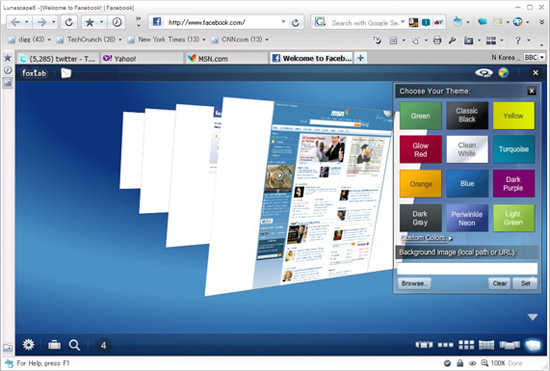
the best browser lunascape5- Lunascape

Lunascape is the world’s first and only triple engine browser. That’s right: it’s a hybrid browser that runs on Gecko, Trident, and WebKit. It supports plugins and add-ons from Firefox, Internet Explorer, as well as their own plugin platform. It’s touted to be faster and lighter than many other browser options.

Why choose Lunascape? : If you find yourself constantly switching back and forth between browsers (either for cross-browser testing of web designs or because of add-ons available only to Firefox or Internet Explorer), Lunascape is a perfect fit for you.

Operating systems supported: Windows


the best browser camino6- Camino

Think of Camino as a Firefox build specifically for Macs, built on the Gecko 1.9 rendering engine. It includes phishing and malware protection, tabs (including a tab overview function that lets you see all your open tabs at once), "annoyance blocking" (which blocks ads, pop-ups, and Flash animations), Keychain support (to save your browsing credentials), and download notifications. It also includes AppleScript support, feed detection, session saving, recently closed tabs, and full keyboard access.

Why choose Camino? : Camino is a great browser for Mac users who like Firefox but want something built specifically for the Mac.

Operating systems supported: Mac OS X 10.4 or newer

Check out and learn more website links above