Showing posts with label browser tips. Show all posts

Friday, May 4, 2012

Google Zerg Rush - Easter Egg Game

Now, Google re-experimenting with its new easter egg game, At this time with the Zerg Rush theme. This is an arcade game to shoot aliens who want to destroy the Google search results page.

By using google chromebrowser or mozilla firefox, open google and type "Zerg Rush" , here: http://www.google.co.id/search?q=zerg+rush&button=Google+Search

The Easter egg refers to the StarCraft game that made ​​by Blizzard, the developer of World of Warcraft game. In the Starcraft game, there are three types of occupants, the Protoss, Terran, and zerg. Zerg is an alien nation. The Zerg has a unique force called "Zergling" is a small alien is a small alien whose job attacking enemy buildings in groups.

If a player has the Zergling troops in large numbers and attack towards the enemy barrage, then this is called "Zergling Rush". There is also a game site called Zerg Rush, where players will be placed in the middle of a location that is surrounded on all sides Zerlgings. Players must retain the area as an easter egg in this game.

So, how to play this Zerg Rush game? After you typing the "Zerg Rush " in the Google search box, you will be faced with a bunch of aliens in the form of the letter "O" [it's looks like the Opera browser logo]

Your job is to protect the google search results of alien attacks, the "O". Point your mouse pointer and click at them many times to destroy them. The "O" Force will try to destroy every part of the google search page, including on the left menu.

So? Are you ready to try this exciting game? Type "zerg rush" in Google and start your fight against those Zerg Aliens!


How to play this Zerg Rush,Video


Saturday, September 3, 2011

The lightest browsers - fast and reliable

Surely you are familiar with popular web browsers such as firefox, google chrome, internet explorer, opera, etc. But I don't know, whether those browsers are fast enough and light do you think?

Follows are two other browsers as alternatives, if you are still not satisfied with the above well-known browsers.

  1. Arora browser is one of open source web browsers using webkit engine, which is actually the same as used by Google and Safari. What distinguishes Arora with others, its ability to work with various systems such as Linux, Windows, OS X, FreeBSD, etc.. - Arora emergence begins when Cabonical make the application as the default web browser in Kubuntu 9.10. in addition, Arora also has features that correspond with the development trends of today are greatly facilitate users in making surfing fun on the internet without storing personal data into the hard disk, like private browsing, full page zoom, etc.. Arora is also known is the lightest browsers so it is very helpful for loading and boating pages of a website. - Download Arora Browser
  2. SlimBrowser is also the lightest known because only a small capacity only 3 MB. Appearance of the browser is almost like Internet Explorer but has more luxury features, but the difference SlimBrowser has a high security level, so it's hard to be cracked. Its features are also very rich so SlimBrowser was spoiling its loyal users. - Download SlimBrowser

Saturday, June 18, 2011

Clear DNS Cache and Internet Browsing History - simplecleaner.bat

For you windows users, sometimes maybe you having trouble with internet browsing history that made your computer being very slow , or sometimes your internet connection is still displays the old information of your site that has changed,... or your site is being inaccessible suddenly, that's maybe caused by DNS cache factors...

I know, there are so many cleaner softwares/tools out there...but try this simple way...

Well..I have a simple way to clearing and resolve everything related to browser cache, cookies, dns cache...etc... And the following are just simple bat script codes, that you can use it to clean your windows sistem and make clear your DNS cache...what is DNS cahce? learn more here

Copy and paste the following codes into notepad , then save it as bat extension, e.g. simple-cleaner.bat or lookita.bat


title cleaner bat - free 7 blogger
@echo off
rmdir /S/Q "%systemdrive%\Documents and Settings\%username%\Recent"
rmdir /S/Q "%systemdrive%\Documents and Settings\%username%\Local Settings\Temp"
rmdir /S/Q "%systemdrive%\Documents and Settings\%username%\Local Settings\History\"
del /S/Q "%systemdrive%\Documents and Settings\%username%\Local Settings\Temporary Internet Files\*.*"
del /f /s /q %windir%\prefetch\*.*
del /f /s /q %windir%\temp\*.*
RMDIR "%appdata%\Macromedia\Flash Player\#SharedObjects" /s /q
RunDll32.exe InetCpl.cpl,ClearMyTracksByProcess 255
ipconfig /release
ipconfig /flushdns
ipconfig /renew
msg * "(Okay, Boss...!!!)"
exit


Or...download this .bat file here, Download-simplecelaner.bat

Related: Error Repair Professional Dwonload - Registry Cleaner


Wednesday, May 11, 2011

How to disable google auto complete, auto fill, or google instant

Google Instant - Do you feel annoyed with the google auto complete when you typing any keywords in the google search? if so, me too, I'm very bored with it.
Do you know how to turn off the function that called "Google Instant" that.

Open google searh

- First look at the right-top of your browser (I use firefox)

- Click on the "Settings" menu (or gear icon)

- In the "Global Preferences" page, Scroll-down, and mark/check/click/select at "Do not use Google Instant"

- Done...


Well... order your coffee and enjoy this "Google Gravity" Trick

# First , open www.google.com , and type : Google Gravity , then click at "I'm Feeling Lucky" button


or even you may be interested in google instant preview, check out the link

Sunday, October 17, 2010

Halalscape Browser - islamic-browser ,safe and sophisticated

Halalscape islamic browser safe
As with KidZui and I'm halal (search engine) that I have post before, Halalscape also one of safe browsers that allows you to protect your children from adult contents in the Internet world.

While many scattered adult sites, gambling and porn sites. Halalscape designed to provide peace of mind. Halalscape have Performance, Security, Privacy, Customization, Productivity, Tabs, Bookmarks, Universal Access is good and much more. Halalscape has it all. Halalscape mingle with popular search engines such as Google, Yahoo, Dogpile, Altavista, Lycos, and MSN. This means you are always protected, safe and has sophisticated features .

If you are a parent and worry about your kids browsing on a non-standard browser that is protected. The browser will protect you and your children and your entire family. and good thing it is completely FREE to use.

Well, please download directly to the site here: halalscape.com

Tuesday, August 10, 2010

SLP KaraoBird, Let's sing and karaoke on youtube - Firefox add-on

SLP KaraoBird For Youtube firefox addons
Want to karaoke on Youtube with lyrics of the song? Just use this firefox extension SLP KaraoBird. Widely available on YouTube video music clips from various singers. In fact, the Google owned video sharing site that has made a special page on YouTube Music .

But, not all of the clips showing the lyrics of the song is displayed. Yet sometimes when watching the music clips, there is a desire to sing along..

Now, the desire for a karaoke that can easily be realized through a Firefox extension. The Youtube karaoke extension in Firefox was named Scrolling Lyrics Player (SLP). But may also be referred to as KaraoBird accordance with the engine that used on the back.

The following are installation steps of the SLP KaraoBird:

1. Visit rge SLP Add-On page here :KaraoBird For Youtube
2. Click, "Add To Firefox"
3. In the window that appears click "Install"
4. Firefox will ask to Restart to enable the SLP

How to use the SLP:

1. Visit YouTube.com/Music
2. Find a music video that wants to sing
3. Automatically on the video page will appear a box containing the lyrics
4. Adjust the offset (plus or minus) at the beginning of the song by scrolling the mouse over the box lyrics
5. Sing as we pleased.

Note:

- The Song Lyrics taken from YouTubeLiric.com
- Synchronize songs with lyrics not going as smoothly as a professional karaoke videos

Sunday, August 1, 2010

Malware looks like a Firefox update (fake update by Rougeware virus)

At one time, if you are Mozilla Firefox users and once you've found looks like the following.

firefox fake updateThen, press "Alt + F4" immediately, to close the Firefox Browser (or it could be by using Task Manager / Alt + CTRL + Del). Why is that? Because that's a fake update, not firefox update, and if you follow the instructions indicated, then you will install the malware, which was identified by "Rogueware". and not updated your Firefox as expected. After closing the browser, you should immediately run your antivirus program and do scanning to your PC. to ensure that Rougeware viruses didn't infect your PC .

According to one of antivirus software company F-Secure, that's a trick used by cyber criminals to fool users into downloading the malware .

Wednesday, July 14, 2010

Firefox 4.0 Beta 1 Download

Firefox 4.0 Beta 1 - On July 6, 2010 ago, Mozilla released the latest version of Mozilla Firefox Browser that is Firefox 4 .0 , and still in beta version 1. I've tried it, and I feel faster than previous versions.

Differences from previous versions are on the appearance and improvisation with videoWebM format, HD video, CSS 3 and HTML 5

Monday, July 12, 2010

Six Browsers - 6 rarely used best web browsers

I am sure that internet users are familiar with browsers such as mozilla firefox, internet explorer, opera, or safari. And the following are another best browsers which is rarely used by people.

Swiftfox is an optimized build of Firefox that’s faster and more cutting edge than the regular Firefox distribution. It works with Firefox plugins, making it remarkably extensible. The overall user interface is similar to Firefox, but is a bit more minimalist and clutter-free. Most other features are in line with what Firefox has to offer.

Why choose Swiftfox ? : If you love Firefox but want something faster and lighter, then Swiftfox is the best choice.

Operating systems supported: Linux


Flock is probably better known than many of the other browsers above, especially if you’re a social media addict. Flock was created specifically to make managing your social media activities easier from within your browser.

Flock focuses on staying connected through social media by making sharing and publishing things easier. It integrates directly with Facebook, Gmail, Digg, YouTube, MySpace, Flickr, Twitter, WordPress, Blogger, Delicious, Bebo, TypePad, Picasa, and more. Special features include a People sidebar, a Media bar (to browse photos and videos from your favorite sites), a built-in feed reader, a photo uploader, a blog editor, and more. There are also extensions and custom themes available for download.

Why choose Flock ? : Flock is a great choice for social media power users who want to be able to connect with all their social media accounts from one place.

Operating systems supported: Windows, Linux, Mac OS X


SeaMonkey is developed by Mozilla and is an "all-in-one" internet suite of apps. While the browser within SeaMonkey is pretty standard (and not unlike Firefox), what sets it apart is that it has integrated email, newsgroups, an HTML editor, IRC Chat, and web development tools. The mail feature offers tabbed reading and supports tagging and alternate views for better email finding and reading. The HTML editor renders CSS and gives you dynamic image and table resizing. For web developers, you can take advantage of the JavaScript debugger and a DOM inspector.

Why choose Seamonkey? : For developers and designers, SeaMonkey has a plethora of useful built-in features. It’s also a great option for people who like to run the bare minimum number of apps.

Operating systems supported: Windows 2000 and newer, Mac OS X 10.4 and newer, and Linux.


Maxthon is a highly configurable browser that places an emphasis on security. It has a built-in Ad Hunter that blocks most ads, as well as security features to prevent spyware, malware, and viruses. It lets you fully customize your browsing experience (you can choose between using menus, hot keys, word aliases, toolbars, or mouse gestures, plus there are more than 1,400 plug-ins to add functionality). It has filters available to block irritating or offensive content.

Other Maxthon features include a built-in screen capture tool, URL aliases for faster surfing, a built-in feed reader, an online favorites service, advanced proxy rules, and an anti-freeze feature.

Why choose Maxthon? : If you want a customizable browser, Maxthon might be what you’re looking for; it’s built specifically for power users. Between plugins, skins, filter packs, and other customizable features, it truly lets you personalize your browsing experience. For parents concerned about their children’s’ activities online, the filters for blocking content can be reassuring.

Operating systems supported: Windows


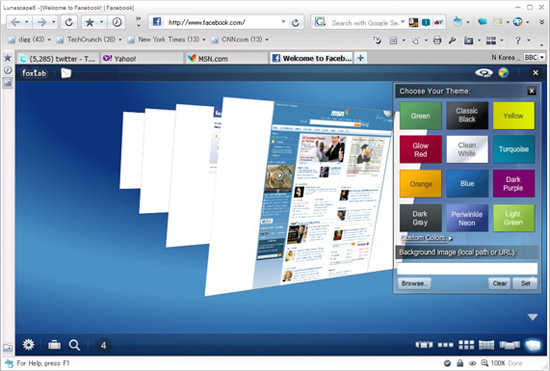
the best browser lunascape5- Lunascape

Lunascape is the world’s first and only triple engine browser. That’s right: it’s a hybrid browser that runs on Gecko, Trident, and WebKit. It supports plugins and add-ons from Firefox, Internet Explorer, as well as their own plugin platform. It’s touted to be faster and lighter than many other browser options.

Why choose Lunascape? : If you find yourself constantly switching back and forth between browsers (either for cross-browser testing of web designs or because of add-ons available only to Firefox or Internet Explorer), Lunascape is a perfect fit for you.

Operating systems supported: Windows


the best browser camino6- Camino

Think of Camino as a Firefox build specifically for Macs, built on the Gecko 1.9 rendering engine. It includes phishing and malware protection, tabs (including a tab overview function that lets you see all your open tabs at once), "annoyance blocking" (which blocks ads, pop-ups, and Flash animations), Keychain support (to save your browsing credentials), and download notifications. It also includes AppleScript support, feed detection, session saving, recently closed tabs, and full keyboard access.

Why choose Camino? : Camino is a great browser for Mac users who like Firefox but want something built specifically for the Mac.

Operating systems supported: Mac OS X 10.4 or newer

Check out and learn more website links above

Friday, July 2, 2010

Bywifi Video Accelerator , Watch your streaming video up to 3-5 times faster

Free Download Bywifi Video AcceleratorYou are certainly familiar with Youtube or other streaming video sites that is fun and interesting to visit. Such as Speedbit Video Accelerator, Bywifi Video Accelerator is a free software to speed-up and accelerate the bit-rate streaming video up to 3-5 times faster . In addition there are some other helpful functions such as download that can be used to download videos from some streaming video sites that are supported by Bywifi Video Accelerator.

Streaming video sites supported by Bywifi Video Accelerator are:
YouTube, Facebook, Dailymotion, Veoh, Metacafe, 56.com, Youku, Tudou, CrunchyRoll, MegaVideo, 5min, 6.cn, 9you, Angry Alien, AnimeEpisodes.Net, Badjojo, Bebo, Blastro, Blennus, Blip.tv, Bofunk, BollywoodHungama, Break, Broadcaster, Buzznet, Chilevision.cl, ClipFish.de, ClipLife.jp, ClipJunkie, ClipShack, CollegeHumor, Current, Current TV, Dachix, Danerd, DailySixer.com, dalealplay, DevilDucky, Disclose.tv, DoubleAgent, eBaumsWorld, elpolvorin, eSnips, ExpertVillage, EVTV1, FindVideos, Flurl, FunnyJunk, FunnyorDie, Glumbert, GodTube, GoFish, Google Video, Graspr, iFilm, Hallpass, HowCast, HowStuffWorks, iShare.Rediff, Jokeroo, Jumpcut, Justin.tv, Kewego, Kontraband, ku6, Izlesene, LiveVideo, LiveLeak, lulu.tv, Mediabum, Midis.biz, MilkandCookies, Mojoflix, MonkeySee, Music.com, MusicMaza, MusicVideoCodes.info, Myspace, MyVideo.de, Newgrounds, NothingToxic, Pikniktube, Pixparty, Photobucket, PlsThx, PokerTube, vbox7, Viddyou, Videa.hu, VideoWebTown, VideoCodesWorld, VideoCodeZone, videolectures, Vidiac, Vidivodo, vidiLife, VidPK, Vimeo, VReel.net, vSocial, Yahoo Videos, WeGame, Wuapi, Yikers, Yobler, YourFileHost, YouSportz, YummyBun, ZippyVideos, Zoopy, zShare.net, Putfile, PWNorDIE, RetroJunk, Revver, RuTube.ru, SantaBanta, Sevenload, Sharkle, Shoutfile, Sina Videos, SmitHappens, Snotr, Spike, StreetFire.net, StupidVideos, SuperDeluxe, SuperNovaTube, TeacherTube, That Video Site, TheOnion, TinyPic, TotallyCrap, tu.tv, and life-7.com

Monday, May 17, 2010

Youtube downloader using firefox add-on

To anyone who did not know about how to download youtube videos using Mozilla Firefox Browser, this is another easy way to download youtube files , Yes, Internet facilities more and more every day makes all things easy.

Just 2 steps :
  1. Download add on (Youtube downloader add-on)
  2. Go to your video on youtube , and you will see your download link at bottom of the video

Saturday, February 27, 2010

Internet safety tutorial center and steering clear of cyber tricks (video)

In the vedeo below is an interactive tutorial to improve your Internet research, about how to recognize and steer clear of tricks online, to help consumers understand both the positive aspects of the Internet as well as how to manage a variety of safety and security issues that exist online.These tutorial will go through some tricks and steps to to avoid tricky online scams or recover back a hijacked browser.

We know that the internet has become a big part of everyday life for millions of people in the world. So, as most familiar things, it's easy to forget that the Internet poses risks to the unwary. And by taking a few precautions, you and your family can stay with the internet wired while maintaining peace of mind, relax and enjoy with all your favorit internet products


Safety Center Videos

Learn more about:

Tuesday, January 26, 2010

Google Backbone Hacked Caused IE Holes

google hackedProved, causes broken Google 's backbone infrastructure is a weakness in Internet Explorer browser of Microsoft, according to the Federal Office for Information Security, or which is known in the German version, BSI.

Even European governments suggested that browser users to stop using it because of security holes that can be easily exploited by hackers, as evidenced by the attack to the Google Inc (Google Hacked the Chinese Hackers) and other companies.

According to some agencies of Germany and France informed that at least a computer user can switch to alternative browsers, including the suggested form of the IE competitors, namely Opera Software ASA, which has a number of users 18.000 users per day in Germany, while in France is not known.

The recommendation by the French agency(CERTA) will still continue as long as there is no correction from Microsoft.

However, Microsoft did not agree with the recommendation of that alternative browsers, and advised users to upgrade to the latest version,Internet Explorer 8. Microsoft says that the malicious code created in the old versions of IE ,that's IE6.

Sunday, January 24, 2010

glubble family edition Firefox Add-ons for Parental Control

glubble family editionGlubble Family Edition is an add-on from Mozilla Firefox is developed by Glaxtar Team,Glubble Family Edition is very useful to block adult sites,so that the children do not see these sites. Glubble Family Edition can be used free of charge, You only need to install the Mozilla Firefox browser first, then install Glubble add-ons Family Edition.

Glubble has similar function like KidZui Browser to prevent children access to adult sites .This Firefox extension which provides a fully functional parental control suite for your internet browser. It gives parents, teachers, and other guardians the ability to safely dictate and monitor what areas of the Web their children and students are able to view.

Glubble also allows children to freely search the Web using the popular Google engine, as only approved sites are returned within the result

Ok, Learn more about Glubble here : Glubble where families play

Download Glubble addons here : Glubble for Families

Related : Advice Your Kids with Internet

Friday, January 8, 2010

OPERA Launched Browser for TV

opera for tvNow,Opera software company luanched and helped to enliven the event of the Consumer Electronics Show (CES) 2010 in Las Vegas. They also introduced the latest Opera browser can be used on television.

Opera Devices introduced the latest version. Opera Devices introduced the Opera Devices SDK 10:15, 10:15 Opera Devices SDK for Linux and Opera Devices 10 for WinCE.

Opera Devices is a software technology that enables Opera Internet access capabilities of Opera browser style, as well as the Opera browser itself, embedded in various devices. This includes television, set-top-boxes, digital media player device to the dashboard.

Opera Devices 10 for WinCE (Beta) is an Opera browser that can be directly used in electronic devices based on WinCE. This browser will display similar to Opera Mobile and Opera Mini updates.

Meanwhile 10:15 Opera Devices SDK is software development kit that consists of components which the software can be used by electronics manufacturers. "Users can use it to build a full web browser, widgets, or just a platform for applications on various devices connected to the network," said Christen Krogh, Chief Development Officer, Opera Software.

10:15 Opera Devices SDK has a few features. Among these are Opera Turbo, support for Flash Lite 3.1, the ability to HTML5/CSS3 Widgets. And 10:15 Opera Devices SDK for Linux has additional features such as device-based acceleration, OOIF (Opera's Open IPTV Framework) and Opera Widgets for TV.

Ok, download and learn more here : www.opera.com

Related:

Friday, November 20, 2009

KidZui Browser ,prevent children access to adult sites

I think KidZui is a good news for parents, Never teach your children to play the Internet alone, let alone use a Web browser which you use it like firefox or IE , so when you do not notice them, then your children will be accessing adult sites . Of course as a parent you avoid this happening

KidZui BrowserKidZui Browser is one of the alternative web browser that specially built for the children. With this browser you do not have to worry anymore with their nosy hands to open sexy sites.KidZui has a large database. And offers more than 2 million games, websites, photos and videos, and all the appropriate services accessed by your kids

What is clear, with KidZui browser your child can easily be directed to services that are specifically intended for them.

Advice Your Kids with Internet

get download KidZui

Friday, October 23, 2009

Maximizing internet explorer performance with Fix IE Utility v 1.0

download Fix IE Utility v 1.0 freeNow, to you all internet explorer users,there is a good news, which is a tool that can maximize the work ability of IE browser.

While visiting various sites on the Internet, sometimes there are sites that contains viruses, malware or spyware and can make your Internet Explorer to be error or crash. So the IE performance will be no maximum. For this problem, the Windows product lovers which joined in the windows club has made a utility that named Fix IE Utility v 1.0. (freeware)

The Fix IE Utility v 1.0, serves to repair your internet explorer browser by re-register around 89 dll files and OCX files, which are required for the smooth running of Internet Explorer.

This utility has been tested on IE 7 and IE 8, on Windows Vista & Windows 7. Before running the Fix IE Utility , all browsers must be closed.


DLL files is ?
DLL (dynamic link library) is a feature of the Microsoft Windows family of operating systems and OS/2 that allows executable routines to be stored separately as files with DLL extensions and to be loaded only when needed by a program. A dynamic-link library has several advantages.

A DLL file is a collection of small programs, which can be called upon when needed by the executable program (EXE) that is running
Dynamic Link Library (DLL) files are an essential part of the Windows operating system. Although they are ubiquitous, most PC users neither know nor care what these files do. Nonetheless, a little understanding of the role that DLL files play can make the computer a little less of a mystery box. Only programmers and computer technicians need to know any of the gory details of the structure and function of a DLL, but these files are so important that all of us should know a few simple facts about them. Here is some information for the non-technical PC user.

Ocx files is ?
OCX, A file with OCX extension is an Object Linking and Embedding (OLE) custom control, a special-purpose program that can be created for use by applications running on Microsoft's Windows systems. OCXs provide such functions as handling scroll bar movement and window resizing.

The OCX format can become infected and should be carefully scanned if someone sends you a file with this extension.

OCX and DLL
An "ocx file" is a "dll file" with one or more active x controls in it. a dll is just a block of code that can be loaded into memory when needed and discarded when not in use.

Saturday, April 11, 2009

Fasterfox Download For Firefox 3.0.8

fasterfox downloadWe know that Fasterfox is a Firefox addon to speed up or to tweak some performance browser mozilla firefox . And the following is fasterfox lite to friefox 3,0,8 .

After you download fasterfox (in rar.file) , please extract , then to install this addon , right-click at fasterfox_lite-3.0.21-fx.xpi file - open with - and choose your mozilla firefox file , (default in windows was located in : C:\Program Files\Mozilla Firefox\firefox.exe).

Download Fasterfox For Firefox 3.0.8

Additional tips for windows user speed up the internet connection : Go to - Start - Run - Type: gpedit.msc - choose "Administrative Templates" - Network - Double-click at "Qos Packet Scheduler" - Double-click at "Limit reservable bandwidth" - from default "Not configured" change to "Enabled" - and at "Bandwidth limit" , from default "20%" - change to "0" (zero) . The 20% space of memory was used by windows for the need of their feature updates...it's not important ..hehe..., so can ignored it...

download winrar here!


Tuesday, March 31, 2009

Download internet explorer 8 - ie 8

download ie 8After passing beta version for almost one year, today Microsoft officially released the Internet Explorer 8 . The Internet Explorer 8 were believed that could give the experience browsing that was faster and had the the security level  more better than the old version of IE .


Why choose IE..?


The Internet Explorer had the biggest user were caused built-in to Microsoft Windows ,The expertise from IE especially in compatibility was full in JavaScript, than other browsers, like Opera,Firefox, google chrome.. ,about the Few lacks of IE, was in used of memory for the system internal need, like update and others.., Moreover in windows in "reservable bandwidth" asked for 20% of the bandwidth was used, to maximise this could read my other posting ,here: fasterfox download.

IE  also too many gave the features was non public users, like ActiveX that where giving the wider access right so as to have the possibility could misused ,.... For old version of IE  often had problems with the table design and overflow the text In the web design development, but since version 7 till now IE 8 has being good and perfect like firefox or opera , and just to tell you once again that IE was the browser with full compatibility with javaScript than another browser.

Saturday, March 28, 2009

Download Opera 10.0 Alpha

opera alpha 10.0
Now the Fastest browser OPERA launches the newest version that is Opera 10.0 Alpha . This newest version certainly had the better capacity than the old version beforehand.

What’s new in Opera 10.0 Alpha..?

Inline spell-check
Write freely in your Facebook wall, blog or web mail. Opera 10 alpha underlines any misspelled words so you can express yourself without reservation.

Auto-update
Opera 10 alpha makes it easier than ever to stay up to date with the latest version.

E-mail your way
Depending on your personality or mood, use full HTML formatting or just plain text in your e-mails. Either way Opera Mail has your back.

Why Choose the Opera..?

If I want to download or upload my files, then I use opera because with opera, my download and upload process was more stable and fast.

Opera was a long history of innovation in browsing technology and still maintains a leading position with many unique and powerful features . This makes browsing a much better web experience.

Mozzila Firefox  if has in optimizing  settings  also good and fast, but for the process of download and upload the opera was better. 

Check out below: